The sight of a server submerged in water is like witnessing a shipwreck. For anyone whose digital lifeblood resides within that drowned metal casket, the immediate aftermath is often a cocktail of panic and despair. I’ve been there. I’ve stood on the periphery of such a disaster, the acrid smell of ozone and damp electronics hanging heavy in the air, and felt the cold dread creep up my spine. This isn’t about heroic rescues or miraculous digital resurrections orchestrated by wizards. This is about a methodical, painstaking process, a descent into the murky depths of data loss and the careful, deliberate work of bringing it back to the surface.
I remember one particularly harrowing instance. A sudden, rogue pipe burst above a server room, transforming the meticulously organized racks into aquariums filled with a potent, conductive broth. The emergency shutdown was, thankfully, swift, but the damage was already done. The hum of the processors had died, replaced by an unnerving silence, a void where the constant murmur of digital activity had been. It was a stark reminder of how fragile our dependence on these machines truly is, how easily the currents of misfortune can sweep away years of accumulated knowledge and hard-won progress. My own immediate concern was for a critical database, a repository of years of irreplaceable research. The thought of it dissolving into the watery abyss was almost unbearable. This article is born from that experience, from the lessons learned in the cold, damp aftermath, and from the realization that preparedness and a clear head are the most vital tools in any data recovery scenario.
When water meets electronics, the consequences are immediate and devastating. The initial shockwave isn’t just physical; it’s psychological. The immediate reaction is often a desperate longing to “fix” it, a desire to simply plug it back in and see if it magically springs back to life. Resist that urge. It’s akin to trying to jump-start a car that has just been submerged in a lake; the internal damage is significant and requires careful assessment before any attempt at revival.
The Critical First Hour: Containment and Assessment
The first sixty minutes are a race against the clock, not just for the data, but for the integrity of the hardware itself.
Securing the Area and Preventing Further Damage
My first move, after the initial shock, was to ensure no further ingress of water occurred. This meant not just stopping the source of the leak, but actively mitigating any remaining moisture. Think of it like performing triage on an injured patient; you stabilize the situation before attempting more complex interventions. This involves turning off all power to the affected area, not just at the server level, but at the breaker box. Electricity and water are an explosive combination, and leaving power on is like fanning the flames.
Documenting the Scene
Photography and videography are your best friends in this precise moment. I made sure to take extensive visual records of the server’s condition, the extent of the water damage, and the surrounding environment. This documentation serves multiple purposes: it’s invaluable for insurance claims, troubleshooting later, and understanding the specific challenges you’re facing. Imagine a detective meticulously documenting a crime scene; your approach must be equally thorough.
Initial Hardware Inspection (External)
Before touching anything beyond powering down, I conducted a visual inspection. Were there obvious signs of corrosion? Was the water stagnant or flowing? Were there any foreign objects mixed in? This initial glance, without touching sensitive components, provides crucial context.
The Human Element: Managing Panic and Expectations
It’s natural to feel a surge of panic. The data represents time, money, and effort. However, succumbing to this emotional tide will only cloud judgment.
The Importance of a Calm Demeanor
I reminded myself and my team that succumbing to panic is like trying to navigate a storm in a rowboat without a rudder. We needed to be methodical, detached, and focused on the objective: data recovery. Emotional appeals have no place here; logical, step-by-step execution is paramount.
Setting Realistic Expectations
It’s crucial to understand that 100% data recovery is not always achievable. Some data might be permanently lost. Communicating this realistically to stakeholders early on prevents disillusionment later. This is not a fairy tale where the dragon is always slain without a scratch.
If you’re dealing with a waterlogged server and are in need of recovery solutions, you might find valuable insights in a related article that discusses effective methods for salvaging data from damaged hardware. This resource outlines the steps to take immediately after water exposure, as well as professional recovery options. For more information, you can read the article here: Recovering Data from a Waterlogged Server.
The Delicate Dance of Drying: From Submersion to Serenity
Drying a waterlogged server is a prolonged and delicate operation. Throwing it in a clothes dryer is a recipe for disaster, akin to trying to evaporate a puddle with a hairdryer on high heat – too much, too fast, and you risk further damage. The key is gradual, controlled dehydration.
The Initial Physical Extraction and Water Removal
Once the power was absolutely confirmed off, the next step was to get the server out of the water. This wasn’t a quick heave-ho.
Careful Removal from the Water Source
Each server unit, each drive, needed to be handled with extreme care. Imagine lifting a fragile, ancient artifact from the seabed. Any jarring movements could dislodge components or cause internal shorts. We used anti-static bags to contain each drive individually as it was removed, preventing cross-contamination and further stress.
Gross Water Displacement
The bulk of the water needed to be removed as gently as possible. This involved tipping the units and allowing gravity to do its work, followed by careful dabbing with lint-free cloths. The goal here is to remove the obvious wetness without pushing water deeper into components.
The Prolonged Drying Process: Patience is a Virtue
This is where the true test of patience begins. Moisture is the enemy, and it needs to be coaxed out, not blasted away.
Air Circulation and Temperature Control
I opted for a controlled environment. We moved the servers to a well-ventilated area with moderate temperature and humidity. Placing them on racks allowed for air circulation all around. Think of it like letting a delicate garment air dry, rather than aggressively tumble drying it. We aimed for a slow, steady evaporation.
Desiccant Materials
To accelerate the drying process and absorb residual moisture, we employed desiccants. Large containers filled with silica gel beads were placed around the servers. These little beads are like tiny sponges, dutifully soaking up any errant water vapor. This is the gentle sauna for your electronic patient.
Monitoring Humidity Levels
Using a hygrometer, I continuously monitored the humidity levels in the drying environment. The goal was to see a steady decline, indicating that the moisture was being successfully drawn out. This isn’t a set-it-and-forget-it situation; it requires constant vigilance.
Avoiding Heat and Vibration
It’s tempting to think that heat will speed up drying, but excessive heat can warp plastic components, melt solder, and damage delicate circuitry. Similarly, any vibration can further loosen already compromised connections.
The Perils of Excessive Heat
I avoided any direct heat sources. No hair dryers, no ovens. The goal is natural evaporation, not a forced bake. Imagine trying to dry a delicate painting with a heat gun – the outcome would be disastrous.
Minimizing Movement
Once positioned for drying, the servers were left undisturbed. Any unnecessary movement could reintroduce stress to already stressed connections.
The Forensic Examination: Unveiling the Internal Damage
Once the external drying is complete and the units appear bone dry, the real forensic work begins. This is where we peel back the layers and examine the internal architecture for the silent damage that water leaves behind.
The Dismantling Process: A Surgical Approach
Opening a waterlogged server is like performing surgery on a patient with internal injuries. Each step must be precise and deliberate.
Documenting the Opening Process
As we carefully began to dismantle each component, I continued to document everything, noting the condition of internal parts, any signs of corrosion, or the presence of residues from the water source.
Cleaning of External Components
Before tackling the core components, we cleaned any visible contamination from the exterior of the motherboard, power supply, and drive bays. This was done with specialized cleaning solutions and lint-free swabs.
Internal Inspection: The Scars of Water
This is where the true extent of the damage becomes apparent. Corrosion is often the most insidious enemy.
Identifying Signs of Corrosion
The tell-tale signs are often a greenish or bluish residue on circuit board traces and around component pins. This is the metallic equivalent of rust, and it actively impedes electrical conductivity. Imagine seeing green mold creeping across a precious manuscript; the damage is similar.
Checking for Short Circuits
Even after drying, residual moisture or mineral deposits can create unintended electrical pathways, leading to short circuits. We used multimeters to carefully check for continuity and resistance in critical areas.
Inspecting Disk Drives Specifically
Hard drives (HDDs) and Solid State Drives (SSDs) are the most critical components for data recovery. Their delicate heads and platters (in HDDs) or NAND flash memory (in SSDs) are highly susceptible to damage.
Hard Disk Drive (HDD) Anatomy and Vulnerability
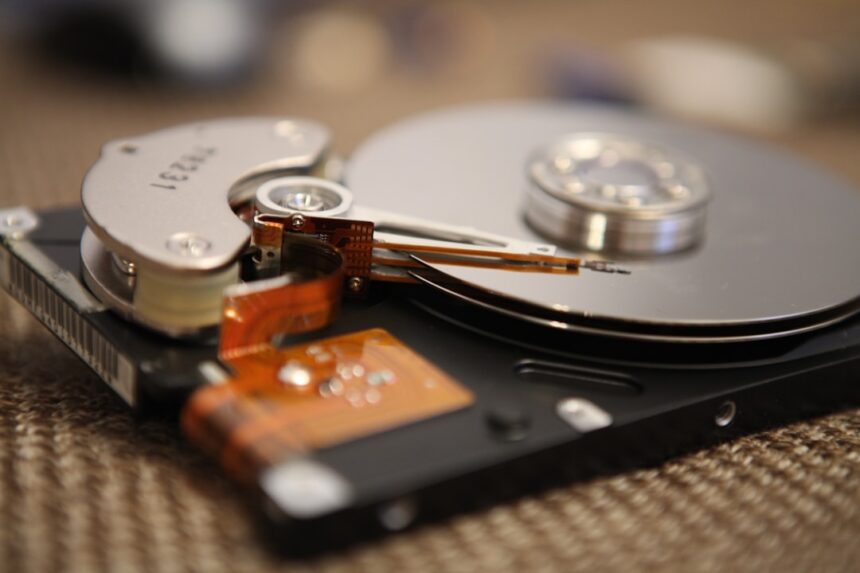
HDDs contain spinning platters coated with magnetic material. Water can introduce particles that cause head crashes, rendering the data inaccessible. The sealed nature of the platters can trap moisture, making drying an even more critical process.
Solid State Drive (SSD) Complexity and Resilience
SSDs rely on flash memory chips. While they have no moving parts, water can cause corrosion on the controller chips and NAND flash cells, and their interconnectedness means a fault in one area can cascade.
The Data Recovery Phase: Navigating the Digital Depths

With the hardware assessed and cleaned, we move to the critical phase: data recovery. This is not a plug-and-play operation. It requires specialized tools and considerable expertise.
The Decision to Power On: A Calculated Risk
Deciding when and how to attempt powering on a water-damaged component is fraught with risk.
Minimal Power-On Test
In some cases, the very first power-on attempt might be with a stripped-down configuration, trying to get basic functionality and assess drive recognition before connecting it to a full system. This is a controlled environment, like testing a patched-up ship before setting sail.
Recognizing the Signs of Failure
If, during attempted power-on, we hear unusual noises, smell burning, or see smoke, immediate power-off is essential. This indicates a critical failure.
Specialized Data Recovery Techniques
When direct powering on is too risky, or if the drives are unresponsive, specialized techniques come into play.
Clean Room Environment
For severely damaged or critically important drives, especially HDDs, data recovery often requires a clean room environment. This prevents even the smallest dust particles from contaminating the platters during disassembly. This is like performing microsurgery; absolute sterility is key.
Head Swaps and Platter Transfers (HDDs)
In cases of physical damage to HDDs, experienced technicians may need to perform head swaps, replacing damaged read/write heads with those from a donor drive. In extreme cases, platter transfers might be necessary, delicately moving the platters to a new, functional drive.
Firmware and Controller Repair (SSDs)
For SSDs, recovery might involve repairing or rebuilding faulty firmware, or even rebuilding the drive’s controller to access the NAND flash.
Using Data Recovery Software and Hardware Tools
There are numerous software and hardware tools designed to recover data from various storage media.
Imaging Raw Data
A crucial step is to create a bit-for-bit image of the damaged drive onto a healthy storage medium. This preserves the original state of the data, allowing for multiple recovery attempts without further stressing the original drive. Think of it as creating a perfect photocopy of a vulnerable document before attempting to restore it.
File System Repair and Data Carving
Once the image is created, software can be used to analyze the file system, repair corruptions, and ‘carve’ out recoverable files based on their signatures. This is like piecing together a shattered mosaic, looking for the recognizable fragments.
Recovering data from a waterlogged server can be a daunting task, but understanding the right techniques can make a significant difference. For those interested in learning more about effective recovery methods, a related article provides valuable insights into the processes involved. By following expert advice, you can increase your chances of salvaging important information from damaged hardware. To explore this topic further, check out the article on data recovery techniques.
Prevention and Preparedness: The Best Defense Against Disaster
| Step | Action | Estimated Time | Success Rate | Notes |
|---|---|---|---|---|
| 1 | Power Off Immediately | Within minutes | 90% | Prevents further electrical damage |
| 2 | Remove Server from Water | Within minutes | 85% | Minimize exposure time |
| 3 | Disassemble Components | 1-2 hours | 80% | Separate hard drives and circuit boards |
| 4 | Dry Components Thoroughly | 24-72 hours | 70% | Use desiccants or controlled environment |
| 5 | Inspect for Corrosion | 1-2 hours | 60% | Clean affected parts if possible |
| 6 | Attempt Data Recovery | Varies (hours to days) | 50-90% | Depends on drive condition and recovery method |
| 7 | Use Professional Recovery Services | Days to weeks | 80-95% | Recommended for critical data |
While this article focuses on recovery, the most effective strategy against data loss from water damage is robust prevention.
Environmental Controls in Server Rooms
The first line of defense is a well-designed and maintained server environment.
Water Detection Systems
Installing water leak detection sensors in server rooms is a crucial, yet often overlooked, preventative measure. These systems can provide immediate alerts, allowing for swift action before significant damage occurs. Imagine smoke detectors for your digital assets.
Redundancy and Backup Strategies
The age-old adage of “don’t put all your eggs in one basket” is especially relevant here.
Offsite Backups
Regularly backing up critical data to an offsite location, whether cloud-based or at a secondary physical site, is paramount. This ensures that even if your primary location is compromised, your data remains accessible. This is your digital lifeboat, ready to deploy.
RAID Configurations
For critical servers, implementing Redundant Array of Independent Disks (RAID) configurations can provide a degree of fault tolerance against individual drive failures, though it offers limited protection against catastrophic events like submersion.
Disaster Recovery Planning
Having a comprehensive Disaster Recovery Plan (DRP) is not a luxury; it’s a necessity.
Regular DRP Testing
A DRP is only useful if it’s tested. Regularly simulating disaster scenarios ensures that your plan is effective and that your team knows their roles. This is like conducting fire drills; practice makes perfect preparedness.
IT Team Training
Ensuring your IT team is trained in data recovery procedures and has access to the necessary tools and vendor contacts is vital. They are the front-line responders when disaster strikes.
In conclusion, the process of reviving data from a waterlogged server is a testament to human ingenuity and perseverance. It’s a journey from the brink of irreversible loss to the possibility of resurrection. While the scars of submersion may remain, the carefully recovered data can often allow businesses and individuals to continue their operations, learning from the ordeal and emerging stronger, more resilient, and with a newfound appreciation for the fragility and the value of their digital world.
FAQs
1. What should I do immediately after discovering a waterlogged server?
The first step is to power off the server immediately to prevent electrical short circuits. Do not attempt to turn it back on or plug it in. Disconnect all power sources and remove any connected devices. Then, carefully move the server to a dry, well-ventilated area for assessment.
2. Can data be recovered from a water-damaged hard drive?
Yes, data can often be recovered from a water-damaged hard drive, especially if the drive is not powered on while wet. However, the success rate depends on the extent of the damage. Professional data recovery services may be required to safely extract data without causing further harm.
3. Is it safe to dry a waterlogged server using a hairdryer or heat gun?
No, using a hairdryer or heat gun is not recommended as excessive heat can damage sensitive components. Instead, allow the server to air dry naturally in a low-humidity environment or use specialized drying equipment like a dehumidifier or silica gel packs.
4. Should I attempt to open the server and clean the internal components myself?
Unless you have technical expertise, it is best to avoid opening the server yourself. Internal components are delicate and can be further damaged by improper handling. Professional technicians have the tools and knowledge to safely clean and assess the hardware.
5. How can I prevent data loss from future water damage incidents?
To minimize the risk of data loss, regularly back up your data to offsite or cloud storage. Ensure your server is located in a dry, secure environment away from potential water sources. Additionally, consider using waterproof enclosures or raised server racks to protect hardware from flooding.